
Stop running your logistics business from scattered WhatsApp messages. Manage everything in one CRM.
SmartBRMs helps logistics companies manage orders, merchants, staff, warehouse stock, delivery updates, expenses, salaries, notifications, and business reports from one clean dashboard.
Orders organized this month
20,000+
The daily problem
Most logistics teams are busy, but not always organized.
Orders come through calls, WhatsApp, social media, merchants, staff, and riders. Without a central system, it becomes hard to know what has been picked up, shipped, delivered, returned, paid, or remitted.
Order confusion
Staff may not know the latest delivery status, merchants keep asking for updates, and management has to call different people to confirm what is happening.
Too much WhatsApp tracking
Important order details get buried in chats, voice notes, and screenshots. This makes it easy to forget updates or lose records.
No clear performance report
Without proper reports, it is difficult to know total orders, active merchants, revenue, staff performance, expenses, salaries, and profit direction.
What SmartBRMs does
One CRM for your full logistics workflow.
SmartBRMs gives your logistics company a private workspace where management, staff, and merchants can work with proper records instead of scattered manual tracking.
Order Management
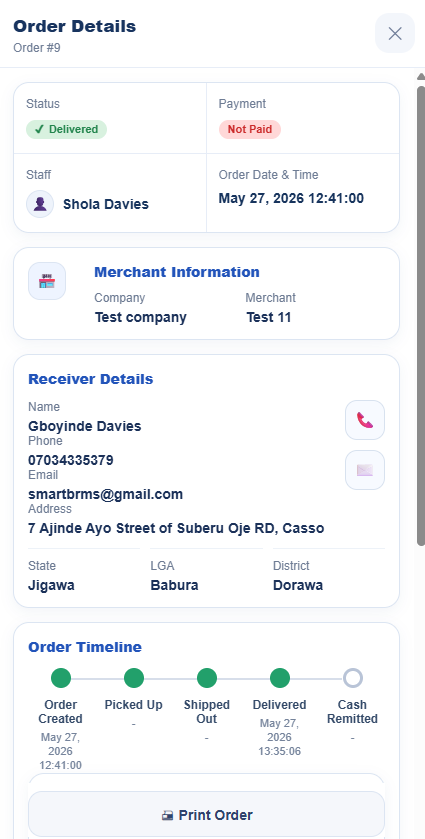
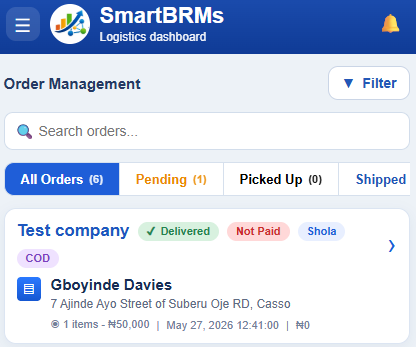
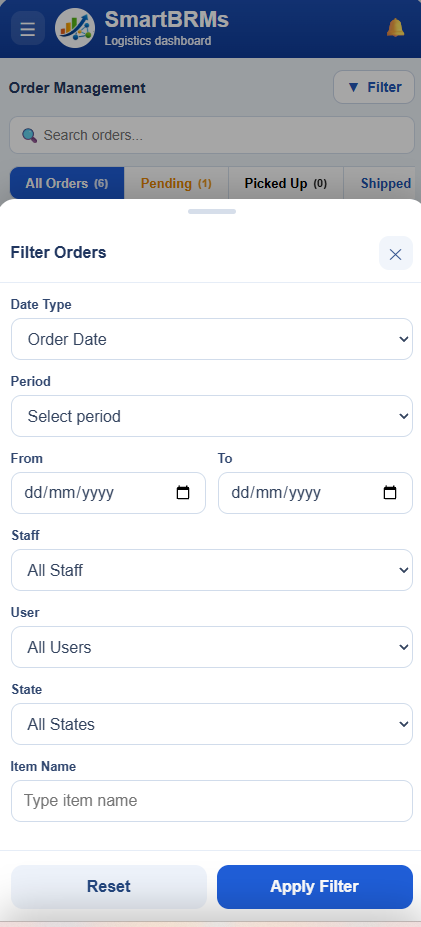
Create, search, filter, and track orders with statuses like pending, picked up, shipped, delivered, returned, cancelled, and cash remitted.
Merchant Management
Register merchants, manage their profiles, track their orders, activate or deactivate accounts, and control their warehouse access.
Staff & Role Control
Create staff accounts with roles like Admin, Manager, and Worker. Control who can access sensitive areas of the CRM.
Warehouse & Stock
Track merchant items, stock quantity, warehouse status, and prevent stock mistakes when fulfilling delivery orders.
Expenses & Salary
Record company expenses, salary payments, and financial notes so management can understand operational cost more clearly.
Performance Reports
View reports for orders, merchants, staff performance, revenue, expenses, and monthly business activity.
Notifications
Admins receive alerts for important activities like new staff registration, new merchants, profile updates, expenses, and account changes.
Receipts & Printouts
Generate order details and receipts for better documentation and cleaner communication with merchants or customers.
Private Company Workspace
Every logistics company gets its own private URL, login page, staff area, merchant portal, and dashboard.
Why it matters
Your team stops guessing and starts working with clear records.
SmartBRMs makes the daily operation easier because everyone sees the information they need. Managers can monitor activity, staff can update orders, merchants can create orders, and owners can see what is happening without asking ten different people.
How it works
From company registration to daily operation in minutes.
SmartBRMs is designed to be simple. A logistics company registers, chooses a plan or starts the free trial, and immediately gets a private CRM workspace.
Create workspace
Register the logistics company, choose a company URL slug, confirm email ownership, and create the Super Admin account.
Add staff and merchants
Invite staff, approve roles, register merchants, and give each person the right level of access.
Manage operations
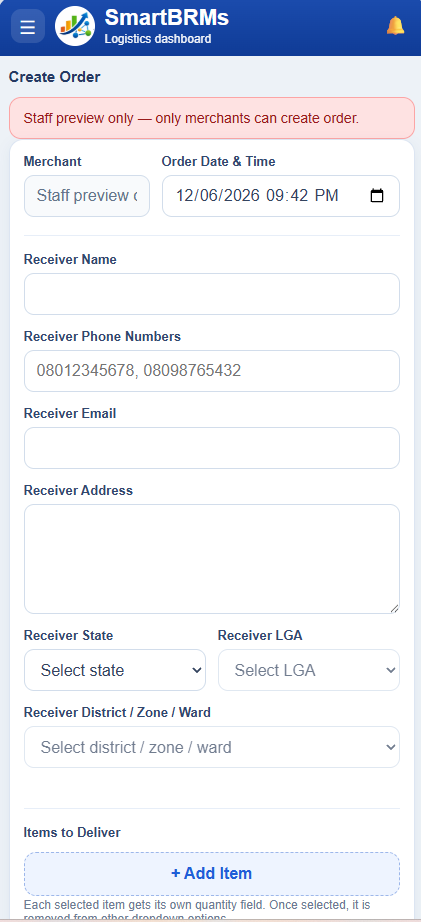
Create orders, update statuses, manage items, control warehouse stock, and track delivery progress.
Monitor performance
Use reports, notifications, expenses, salary records, and order data to understand the business better.
Built for each user
Everyone gets the right dashboard for their role.
Owners & Super Admins
See the full business picture: merchants, staff, warehouse, salary, expenses, reports, notifications, and subscription control.
Staff & Managers
Handle the daily workflow: create orders, update delivery status, manage assigned operations, and keep records clean.
Merchants
Merchants can log in, create orders, manage items, and follow order progress without disturbing staff every time.
Mobile friendly
Manage logistics operations from phone or desktop.
Many logistics businesses work on the move. SmartBRMs is designed to feel clean on mobile screens while still giving desktop users a powerful workspace.
Simple pricing
Every plan gets full CRM features.
The only difference between plans is usage limit: number of staff, merchants, and monthly orders. Your team gets the same powerful tools on every package.
Basic
₦9,000/mo
₦90,000/year
Starter
₦20,000/mo
₦200,000/year
Growth
₦30,000/mo
₦300,000/year
Business
₦45,000/mo
₦450,000/year
Proof section
What logistics owners should feel after using SmartBRMs.
“Before SmartBRMs, our team depended on WhatsApp updates and manual confirmation. Now orders, merchants, staff activities, and delivery stages are easier to monitor.”
“The best part is that merchants can create orders themselves while management still sees what is happening. It reduces pressure on staff and makes records cleaner.”
FAQ
Questions logistics companies may ask.
Do all plans have full features?
Yes. Every package has access to the full CRM. The only difference is the number of staff, merchants, and monthly orders allowed.
Can merchants use the system too?
Yes. Merchants can log in, create orders, manage items, and view their own records, while management still controls the company workspace.
Can staff access be controlled?
Yes. Staff accounts can be assigned roles like Admin, Manager, and Worker, so each person only sees what they are allowed to manage.
What happens after the 7-day free trial?
The company can choose a plan and continue using the CRM. If the trial expires, Super Admin or Admin can renew from the subscription page.
Can a company upgrade later?
Yes. A company can upgrade when it needs more staff, more merchants, or higher monthly order limits.
Give your logistics company a cleaner, smarter way to work.
Stop losing important updates in chats and manual records. Start organizing orders, merchants, staff, stock, expenses, salaries, and performance inside one private CRM workspace.